• Tech Laptop

    0

    Your Laptop in 2018: The Future of Computing

    •  
    •  
    •  
    •  
    •  
    • MORE


    Lead_SF_3
    Think back to the laptop you had in 2008. It probably doesn't look too different from what you're using today. Sure, your current notebook is lighter than the brick you lugged around five years ago, and it's running Mountain Lion or Windows 8 rather than Vista or Leopard, but it's still a clamshell laptop with the same basic functionality. Fast-forward to 2018, and your computing experience will be radically different — but familiar, too.
    Rather than phasing out the traditional laptop, manufacturers are shaping future PCs around emerging trends. For instance, the prominence of mobile devices has spawned thinner Ultrabook designs and detachable tablet-laptop hybrids. Notebooks will also benefit from perceptual computing breakthroughs that will push eye and motion control into the mainstream. Imagine looking at an app to open it or simply glancing up or down to scroll.
    Here's what to expect from your laptop in 2018.

    Form Factors: From clamshells to detachables

    A study from Gartner in April predicted that tablet sales would surpass laptop purchases by 2015. Despite this unpromising outlook, experts agree that the traditional keyboard and hinged display form factor won't disappear anytime soon.

    Howard Locker, a Lenovo executive working on the company's R&D team, compared the clamshell form factor to a piano. Like a notebook, the keys on a piano and its sheet-music holster are positioned conveniently in relation to our hands and our eyes — a design that will always be crucial for computers as well.
    lenovo_keyboard_sf2
    "There's always going to be a need to work with my hands and my eyes at the same time doing something," Locker said. "And the clamshell is the perfect form factor for that, with input on the bottom and visual on top. And that's never going to go away. I don't think the notebook is ever going to go away."
    While some analysts predict that tablets will outpace laptops as early as this year, others believe slates can't replace the traditional typing experience.
    Convertible_sf_sf
    "There's still something to be said for typing on a keyboard rather than a piece of glass," said Tom Butler, director of Lenovo's ThinkPad division. "We know that we're just more efficient on a standard keyboard. Now, there will be innovation that will come along and help extend the capabilities of typing on glass, but having that full, rich keyboard experience is still very relevant in that time frame." 
    That's not to say some alterations in design shouldn't be expected, though. Butler said this is still the first generation of detachable devices, which means that in 2018, laptops with removable keyboards and dual laptop-tablet functionality will likely be the norm.
    Howard_Locker_pull-quote

    Gesture control goes mainstream

    When Windows 8 made its debut in 2012, touch-screen displays quickly became standard for premium notebooks. According to IHS, nearly a quarter of all laptops will have touch screens by 2016, thanks to falling prices.
    But touch-enabled displays are only the beginning when it comes to new methods of interacting with computers. By 2018, using your eyes to play games on your PC or waving your hand to navigate the desktop will be mainstream ways to interact.


    Devices such as Microsoft's Kinect have already popularized gesture control in the gaming industry, but numerous vendors are pushing to make gesture controls a key part of the everyday computing experience. Take the $79 Leap Motion Controller, a compact peripheral that lets you do everything from flip through photos and shoot enemies just by moving your fingers. HP has agreed to integrate Leap's technology directly into laptops in the near future.
    "We think there's something inherently powerful about just opening up [your laptop] and having the space above your computer transform into something interactive," said Andy Miller, president and chief operating officer of Leap Motion. "And when you think about it, we're really just scratching the surface." 
    Meanwhile, Creative is partnering with Intel to put its Senz3D gesture-based webcam inside upcoming notebooks by the second half of 2014. Forget about the exaggerated waves and overpronounced full-body movements you're accustomed to with the Kinect. Gesture-based technology is evolving quickly — so quickly that devices will be able to detect even the slightest movement when it comes to navigating your PC.
    The upcoming Creative Senz3D camera, which could be available as a peripheral by the end of this year, has dual-lens technology that creates a deeper depth of field to enable realistic and lifelike 3D interaction. This means that rather than simply waving your hand left, right, up or down, you can actually reach toward the screen to grab and throw objects in a game.

    Invalid Authorization Response

    The camera adds a more intimate and interactive layer to gaming, as demonstrated in the Senz3D-optimized version of Valve's Portal 2, which will come bundled with the camera as a free download. By subtly moving your hand, you can use real-life gestures to pick up Companion Cubes and throw them across the room or pan around your environment.
    To support these burgeoning modalities, future laptops are likely to come with multiple integrated cameras that feature advanced sensors.
    "There may be two, there may be three, there may be four [cameras], but it's not going to appear to us as anything too different from what we're seeing at the top of our laptops today," said Sanjay Patel, CEO of Personify Inc. The company is partnering with Intel to bring its Personify Live app to the Creative Senz3D camera.

    Eye control

    Perceptual computing is likely to heavily influence your future laptop, but that doesn't stop at gesture control. In five years, you'll be able to breeze through your laptop's interface by simply looking where you would typically point your mouse cursor.
    Tobii's Rex peripheral, which has been available for $995 for developers since January and will see limited consumer availability this fall, lets users navigate the Windows 8 OS and interact with certain applications by simply looking around the screen. But the camera does more than let you move the cursor.
    Carl_Korobkin_pull-quote
    In terms of everyday use, a device such as the Rex could enable you to browse through emails by simply looking up and down your inbox, or to open apps by staring at a particular Live Tile in the Windows 8 interface.
    "It's all about the relationship you have with your device in terms of sight and being able to detect what you're looking at, what you're interested in and what you want to act on," said Carl Korobkin, vice president of business development at Tobii Technology. "And that's what we do."

    Invalid Authorization Response

    Imagine what it would be like to play "L.A. Noire" if staring at the characters' facial expressions actually provoked a visible reaction? Or, picture yourself perusing a map in an "Elder Scrolls" game by naturally moving your eyes to your desired destination. What if you could zero in on your target by simply looking at it rather than having to aim with your mouse?
    tobii_rex_sf
    Tobii recently announced the first Ultrabook prototype that comes with its built-in eye-tracking camera, which is intended to demonstrate how the technology will be integrated into future products. Tobii says its OEM partners are working on devices with more advanced versions of this eye-tracking technology that could hit the market as early as next year. 

    The mouse disappears; touchpads stay

    Between touch screens, touchpads and the occasional stylus, today's devices come with enough modalities to diminish the need for a mouse. As these technologies and perceptual computing continue to evolve, the mouse will become less relevant.
    "I do believe the mouse is going to be displaced, and potentially fairly rapidly," Korobkin said. "But that will take some time. It depends on what applications are available, but I do think that the mouse is reaching the end of its run."
    Manufacturers are beginning to see the effects of these emerging technologies as well. Earlier this year, Logitech, the world's largest mouse maker, suffered a massive net loss of $195 million. Touch-screen usage is only expected to increase over the next five years, although these panels are still considered relatively expensive.
    "OEMs [original equipment manufacturers ] and ODMs [original design manufacturers] will follow these standards when manufacturing notebooks," Peter Lin, senior analyst for compute platforms at IHS, said, referring to the prominence of touch screens in hybrids and laptops. "However, the touch panel is in shortage, and it takes time to expand the capacity and increase the yield rate. It's not easy to get touch panels — and the price is still high — but IHS considers it will be solved in about one to two years."
    Control_options
    Based on current sales trends, Lin believes that touch-screen capabilities, gesture support and voice recognition will be the most desired characteristics in future PCs. Still, despite these burgeoning modalities, there will always be a place for the touchpad on your notebook, according to Locker.
    "I think everything [perceptual computing] is just an overlay," Locker said. "The advantage of the touchpad is that it's very intuitive because it's tactile. If you're in clamshell mode, it's much easier on your body to touch the touchpad than reach out and touch the screen. It's a physical thing, so I really don't see it going away."

    All-day battery life

    Just about every day, we use our smartphones to surf the Web, send text messages and play games — only to plug them in again before we go to bed (or maybe charge it twice per day, if you use it a lot). Unfortunately, the reality is quite different for laptops, with many models in our tests lasting less than 5 hours on a charge. But all-day battery life could become a reality by 2018. 
    battery_sf
    "The beauty of it is, we're seeing decreases in thermal [power required by the device’s cooling system] and significant increases in performance and CPU capabilities," said Lenovo's Butler. "If you fast-forward to the not-too-distant future, you're going to see much thinner and much lighter devices with significantly longer battery life." Butler said we won't need to worry about having to hunt for an outlet halfway through the day.
    IHS' Lin added that although battery life can be an obstacle for manufacturers, major vendors are working to provide "very low power" CPUs for future devices. We're already seeing battery-life enhancements with Intel's newly launched Haswell chip, which promises a 20 percent increase in endurance because it requires less wattage to run applications. For instance, watching HD video used to require 8W of power, and Intel's fourth-generation chip now only needs 6W. According to Lin, Intel will have to shrink down the TDP wattage in its CPUs to 1 or 2 by 2018, which AMD is also on pace to accomplish.

    Looking toward the future

    The PC landscape is changing rapidly, but that doesn't mean the laptop as we know it will become obsolete. Five years down the road, your typical notebook is likely to come with an advanced touch screen with more precision than those found in today's notebooks.
    You'll be able to play games and interact with certain applications by simply looking at them. Your PC will rely on sensors to perceive your gestures and determine your location, and all-day battery life will be the new standard. And the advent of wearable technology and perceptual computing will influence the way we interact with computers as a whole. 
    FormFactors_sf
    "The operating system actually becomes the environment around you," Korobkin said in reference to augmented reality. "Whether it's something we wear on our head or something we interact with that projects images in front of us, that's what I'm picturing in terms of the future of computing environments."
    The current generation of detachable PCs and laptop-tablet hybrids is just the first of many iterations to come, leaving plenty of room for more advancements and innovation.
    "The laptop of the future has to be far more aware and far more perceptual than the devices we're seeing today," said Patel. "It's a trend that's inevitable."
  • Tech Computers

    0
    The top 10 technology trends predicted to reach adoption in 2018 are:
    1. Deep learning (DL)Machine learning (ML) and more specifically DL are already on the cusp of revolution. They are widely adopted in datacenters (Amazon making graphical processing units [GPUs] available for DL, Google running DL on tensor processing units [TPUs], Microsoft using field programmable gate arrays [FPGAs], etc.), and DL is being explored at the edge of the network to reduce the amount of data propagated back to datacenters. Applications such as image, video, and audio recognition are already being deployed for a variety of verticals. DL heavily depends on accelerators (see #9 below) and is used for a variety of assistive functions (#s 6, 7, and 10). 
    2. Digital currenciesBitcoin, Ethereum, and newcomers Litecoin, Dash, and Ripple have become commonly traded currencies. They will continue to become a more widely adopted means of trading. This will trigger improved cybersecurity (see #10) because the stakes will be ever higher as their values rise. In addition, digital currencies will continue to enable and be enabled by other technologies, such as storage (see #3), cloud computing (see B in the list of already adopted technologies), the Internet of Things (IoT), edge computing, and more.
    3. Blockchain. The use of Bitcoin and the revitalization of peer-to-peer computing have been essential for the adoption of blockchain technology in a broader sense. We predict increased expansion of companies delivering blockchain products and even IT heavyweights entering the market and consolidating the products. 
    4. Industrial IoT. Empowered by DL at the edge, industrial IoT continues to be the most widely adopted use case for edge computing. It is driven by real needs and requirements. We anticipate that it will continue to be adopted with a broader set of technical offerings enabled by DL, as well as other uses of IoT (see C and E). 
    5. Robotics. Even though robotics research has been performed for many decades, robotics adoption has not flourished. However, the past few years have seen increased market availability of consumer robots, as well as more sophisticated military and industrial robots. We predict that this will trigger wider adoption of robotics in the medical space for caregiving and other healthcare uses. Combined with DL (#1) and AI (#10), robotics will further advance in 2018. Robotics will also motivate further evolution of ethics (see #8).
    6. Assisted transportation. While the promise of fully autonomous vehicles has slowed down due to numerous obstacles, a limited use of automated assistance has continued to grow, such as parking assistance, video recognition, and alerts for leaving the lane or identifying sudden obstacles. We anticipate that vehicle assistance will develop further as automation and ML/DL are deployed in the automotive industry.
    7. Assisted reality and virtual reality (AR/VR)Gaming and AR/VR gadgets have grown in adoption in the past year. We anticipate that this trend will grow with modern user interfaces such as 3D projections and movement detection. This will allow for associating individuals with metadata that can be viewed subject to privacy configurations, which will continue to drive international policies for cybersecurity and privacy (see #10).
    8. Ethics, laws, and policies for privacy, security, and liability. With the increasing advancement of DL (#1), robotics (#5), technological assistance (#s 6 and 7), and applications of AI (#10), technology has moved beyond society's ability to control it easily. Mandatory guidance has already been deeply analyzed and rolled out in various aspects of design (see the IEEE standards association document), and it is further being applied to autonomous and intelligent systems and in cybersecurity. But adoption of ethical considerations will speed up in many vertical industries and horizontal technologies.
    9. Accelerators and 3D. With the end of power scaling and Moore's law and the shift to 3D, accelerators are emerging as a way to continue improving hardware performance and energy efficiency and to reduce costs. There are a number of existing technologies (FPGAs and ASICs) and new ones (such as memristor-based DPE) that hold a lot of promise for accelerating application domains (such as matrix multiplication for the use of DL algorithms). We predict wider diversity and broader applicability of accelerators, leading to more widespread use in 2018.
    10. Cybersecurity and AI. Cybersecurity is becoming essential to everyday life and business, yet it is increasingly hard to manage. Exploits have become extremely sophisticated and it is hard for IT to keep up. Pure automation no longer suffices and AI is required to enhance data analytics and automated scripts. It is expected that humans will still be in the loop of taking actions; hence, the relationship to ethics (#8). But AI itself is not immune to cyberattacks. We will need to make AI/DL techniques more robust in the presence of adversarial traffic in any application area.
    Existing Technologies: We did not include the following technologies in our top 10 list as we assume that they have already experienced broad adoption:
    A.      Data science
    B.      "Cloudification"
    C.      Smart cities
    D.      Sustainability
    E.       IoT/edge computing
    IEEE-CS technical contributors include Erik DeBenedictis, Sandia National Laboratories; Fred Douglis, systems researcher and member of IEEE-CS Board of Governors; David Ebert, professor, Purdue University; Paolo Faraboschi, Hewlett Packard Enterprise Fellow; Eitan Frachtenberg, data scientist; Phil Laplante, professor, Penn State University; and Dejan Milojicic, Hewlett Packard Enterprise Distinguished Technologist and IEEE Computer Society past president.  The technical contributors for this document are available for interview.
    At the end of 2018, we will review the predictions and determine how closely they match up to technology's reality. Check back in December 2018 as we grade our latest predictions.
    For past predictions, see news release for 2017 technology predictions and grades.
    About IEEE Computer SocietyIEEE Computer Society, the computing industry's unmatched source for technology information and career development, offers a comprehensive array of industry-recognized products, services and professional opportunities.  Known as the community for technology leaders, IEEE Computer Society's vast resources include membership, publications, a renowned digital library, training programs, conferences, and top-trending technology events. Visit www.computer.org for more information on all products and services.

  • Tech Home

    0

    11 best smart home devices

    Whether it's bolstering your home security or feeding your pet dog, this is the clever tech you need in your house
    Click to follow
    The Independent Online
    Sometimes it can be too much work to get off the sofa, slob over to the wall switch and turn the lights down, can’t it? In which case, smart home gadgets are for you. A smart thermostat means you can turn the heating on before you get home, smart speakers can play music when you talk to them and a smart camera can alert you when there’s an intruder – or even feed your dog for you.
    There are several main control systems: Google Home, Apple HomeKit and Amazon Echo. Other companies have their own systems, such as Panasonic and Samsung. They are not compatible with each other, so make sure your gadget of choice works with your system. Some work with more than one. The Google-owned Nest, for instance, does not work with Apple.
    Google Home and Amazon Echo are hardware hubs, but Apple HomeKit means gadgets from Elgato, Philips, Honeywell, Netatmo and more are controlled using the Home app in the iPhone, iPad and Apple TV (until December, that is, when the just-announced Apple HomePod smart speaker goes on sale). There are a number of emerging brands, but for the time being, we think these are strongest products on the market.

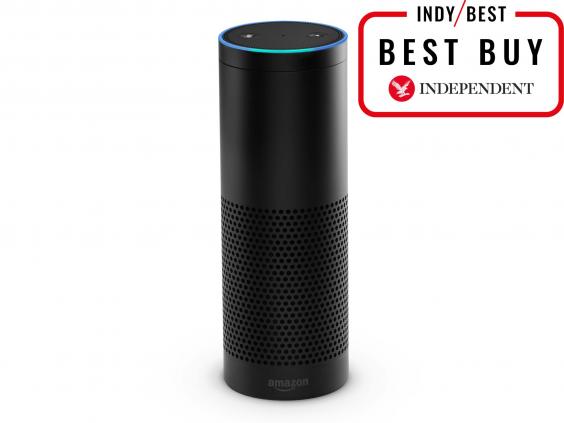
    1. Amazon Echo: £149.99, Amazon
    1-amazon-echo.jpg
    It looks like a tube of Pringles but this is a voice-controlled speaker with its own virtual assistant, called Alexa. Say, “Alexa, turn up the heating in the living room” and if you have the right thermostat such as Nest, British Gas Hive and a range from Honeywell, Alexa will oblige. She will also tell you a joke, confirm sports scores, convert pounds to kilograms and so on. The multi-directional speakers in the Echo can be used for playing music, too, though this is not hi-fi quality. Incidentally, if you have a person called Alexa in your household, you can change the “wake word” which gets the system listening to you. Available in black or white finish. You can also order an Uber, control the Neato Botvac and tell you your weight that morning on the Fitbit Aria bathroom scales. Alexa understands most of what you say, however there are some teething problems: invoking the Nest thermostat required careful diction for it not to think we were saying “next”, for example.

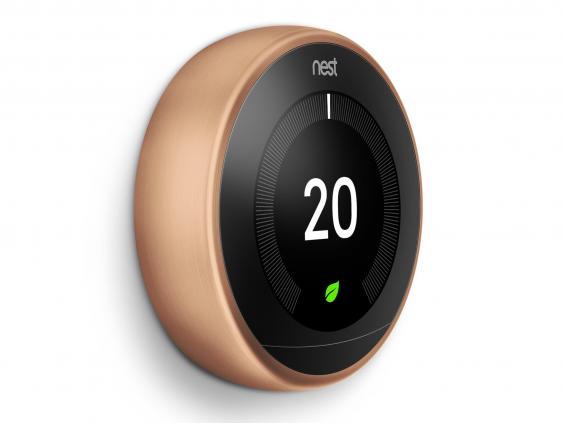
    2. Nest Learning Thermostat: £279, Nest
    2a-nest-thermostat.jpg
    The handsome Nest comes in several anodised aluminium finishes and can be wall-mounted or placed on a portable stand (£29 extra). It talks wirelessly to your boiler and can control radiators and water heating. If the sensor realises you have left the house it switches to Away mode, to save energy, though you can also turn heating and water on or off remotely via your smartphone. The system gently encourages you to turn the heating down and emails you an energy summary each month. You can set a schedule, though for the first few days it notes when you turn the heating on and off and creates a suitable timetable automatically. Works with Google, Amazon. Installation by a Nest-approved agent is quick, simple and only adds £50 to the price. It doesn’t work with every kind of heating but the website is pretty comprehensive and guides you through crucial details.

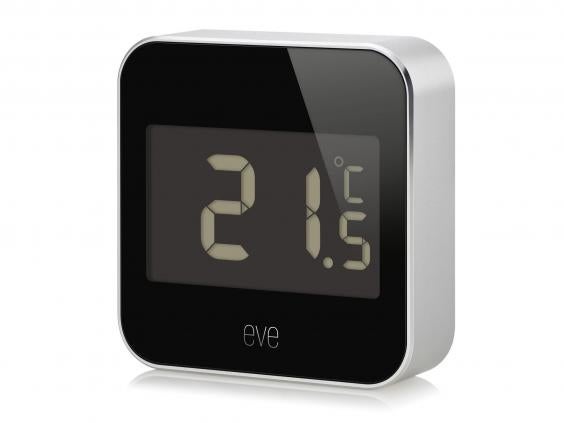
    3. Elgato Eve Degree: £59.95, Apple
    3-elgato-eve-degree.jpg
    The new Eve Degree is an attractive, tiny weather sensor. It has an anodised aluminium case and is easy to set up: turn it on, download the Elgato Eve app and point your iPhone’s camera (it’s only compatible with HomeKit) at the code printed on the bottom. And you’re done. The Degree has water-resistance so it can be placed outdoors or in. It measures humidity, temperature and atmospheric pressure. You can check the temperature and so on remotely by using the excellent Eve app or the Home app on Apple devices. Or just say, “Hey Siri, what’s the temperature in the living room?” and your iPhone or Apple Watch can tell you. Works with HomeKit.

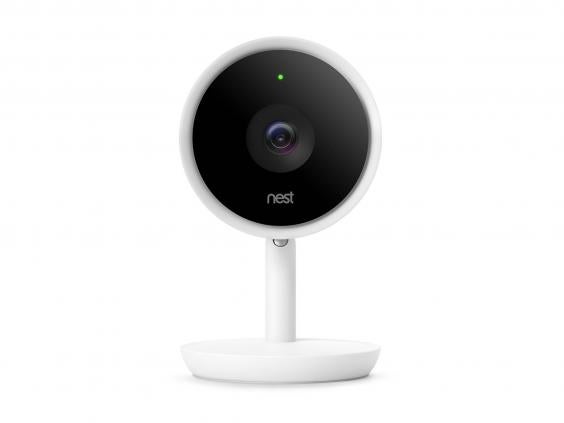
    4. Nest Cam IQ: £299, Nest
    4-nest-cam-iq.jpg
    The IQ is Nest’s latest security camera is very smart and advanced. It looks great, too. A high-quality lens and digital sensor means if it sees an intruder, say, it can alert you and stream footage at high enough resolution to make the evidence useful. Clever software also means the transmitted video can zoom in on a person and follow them round the room. It has face recognition smarts, too, available as part of Nest Aware which has an £80 a year subscription. It can see in the dark and a speaker and microphone mean you can communicate with home from your phone. Available for pre-order now for delivery within a few weeks. Works with Google, Amazon. Straightforward to set up and with a slick app.

    5. Philips Hue Ambiance Starter Kit: £139.99, Argos
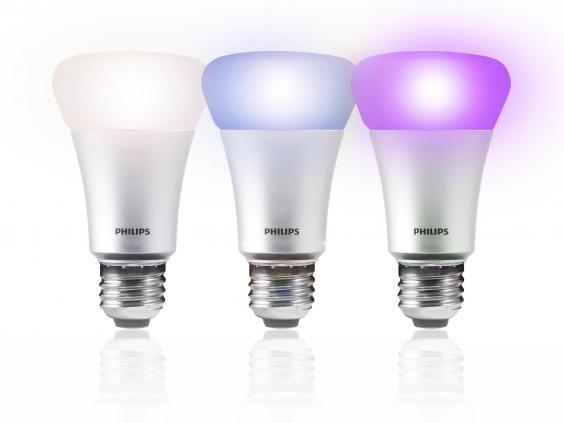
    5-philips-hue.jpg
    The Philips Hue range is tremendous. There are three bulbs in the starter kit which are controlled from a wireless bridge unit. The bulbs can be set to and of 16 million colours – just pick the shade you like best and you can set up automated timers. Or turn the lights on and off remotely. You can add other Hue lights such as candle bulbs and standalone lights. Choose from screw fit or bayonet fitting bulbs. It works with HomeKit, Google Home and Amazon and does equally well with each.

    6. Google Home: £129, Currys
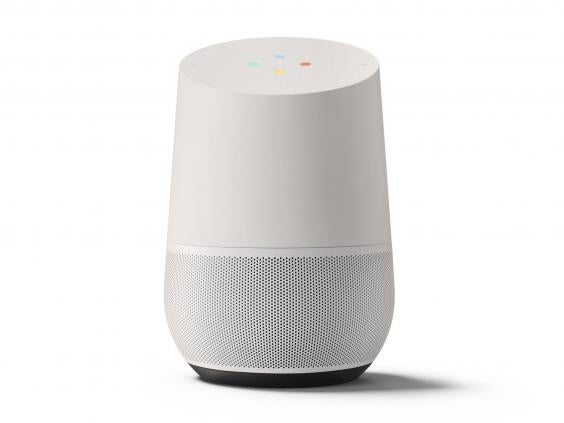
    6-google-home.jpg
    Google’s smart speaker looks more striking than Amazon’s Echo and does many of the same things as soon as you’ve caught its attention by saying “Okay, Google”. If you’ve used Google’s voice recognition on its phone app you’ll know it’s pretty accurate. It’ll play music from services like Spotify, as the Echo does. It can also set alarms, timers, add items to a shopping list, tell you the time your commute will take today and so on. And of course it can set the temperature on your Nest thermostat, Belkin, Honeywell, Samsung SmartThings and so on. It works with your smartphone, Apple and Android, which is where you set up new accessories to work with it.

    7. Elgato Eve Energy: £44.95, Apple
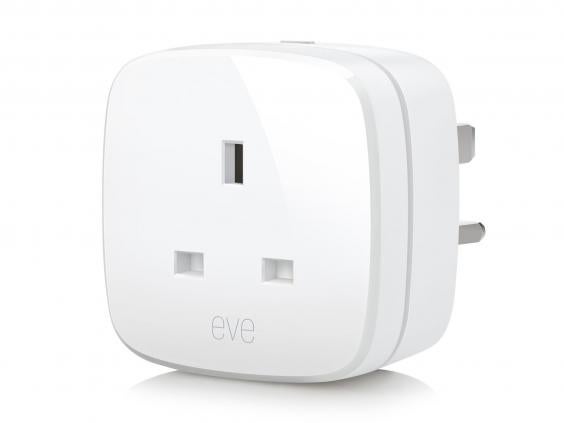
    7-elgato-eve-energy.jpg
    A smart power switch is one of the simplest ways to get into home automation. This HomeKit-enabled device plugs into your wall socket and then you can plug your light or fan or kettle or whatever into the switch. Like the Degree, it’s easy to set up and it means you can turn the attached electrical device on and off remotely and monitors electrical consumption. Then it can calculate the cost of the switch’s usage. Works with HomeKit.

    8. Furbo: £225, Amazon
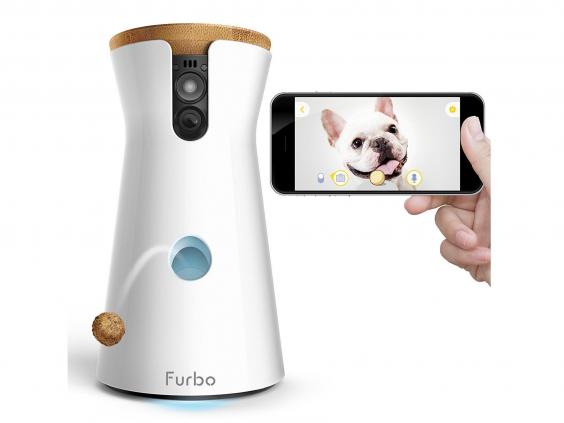
    8-furbo.jpg
    Ever wondered what Fido does during the day? Furbo is a smart dog camera which lets you see what your dog’s up to, when they’re in front of the lens. A microphone and speaker let you talk to the dog or get an alert when the dog’s barking. And Furbo has one more trick up its sleeve: before you go out, fill the device with treats. Then, with a press of the screen in the smartphone app, Furbo will eject a treat for your dog to enjoy. Mind you, you shouldn’t be leaving your dog on their own all day, you know that, right? It works through its dedicated smartphone app which is available on iOS and Android.

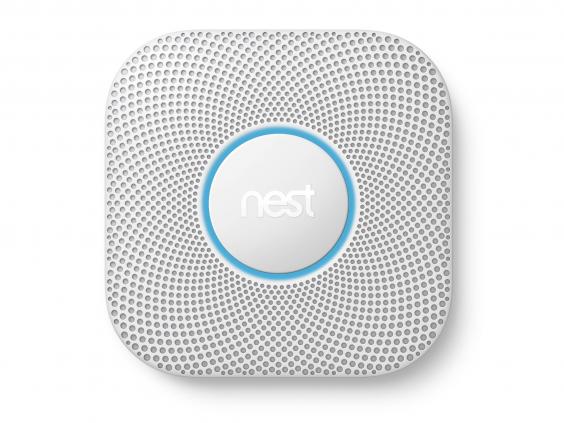
    9. Nest Protect: £99, Nest
    9-nest-protect.jpg
    This is the most elegant smoke and carbon monoxide alarm you’re likely to see. It’s a smart sensor, too, as it can tell the difference between smoke and steam. And instead of the shrill and unpleasant noise most smoke alarms make, this one speaks a warning before the alarm proper goes off. It alerts your phone, too. It comes in two versions, wired and battery-powered. If you have the battery version, it alerts you when the battery needs replacing. If you have Nest Thermostat, the two can work together so if Protect detects an emergency, Thermostat turns off the heating. It even works as a night light when it senses you walk past it. Works with Amazon, Google.

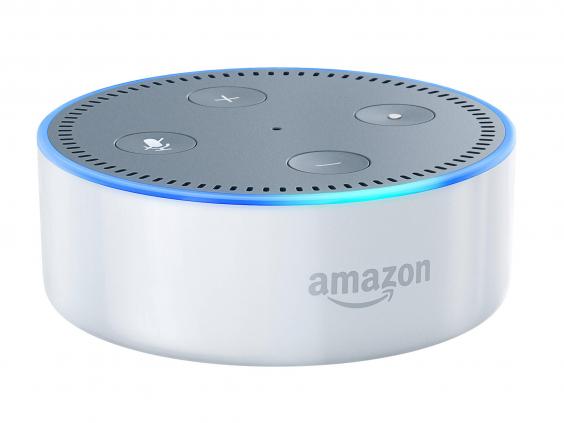
    10. Amazon Echo Dot: £49.99, Amazon
    10-amazon-echo-dot.jpg
    This is one of the big bargains of the smart home world. A small hockey puck of a gizmo, it listens as the bigger Echo does for your spoken command. It’s not designed to be a music speaker like the Echo but instead you can connect it to hi-fi speakers so it can play music through those instead. Like the bigger Echo, you can ask it to read the news, today’s schedule, set a timer while you’re cooking or as an alarm in the bedroom. Audio is good enough to play the radio, for instance.

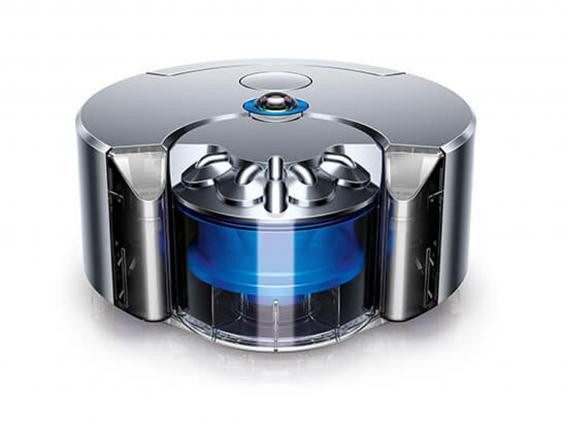
    11. Dyson 360 Eye: £799.99
    dyson-360-eye.jpg
    You know with Dyson you’re going to get something impressive, and this small robot vac didn’t disappoint. Although this one has the largest price tag, it’s the smallest and most compact (roughly the size of a Quality Street tin), taking up minimal space in the cupboard or at its charging dock. It’s simple to use – you leave it to charge and then press the (only) button to get it going. It works its way methodically around your home and if it gets stuck on rugs or shoes, it turns off, navigates its way back to safety and starts again. It maintains Dyson’s high suction power, although still not as good as a standard vacuum cleaner, and certainly sucked up the most dirt out of all the robots tested. The app allows you to schedule when you want your robot to start cleaning and the instruction manual is clear to follow (unlike others we read).  
  • Copyright © - TechZero

    TechZero - Powered by Blogger - Designed by Johanes Djogan